Pro Studio Elite
Image Crop Engine
Crop, resize, and export images for any platform — social media, web, print. Supports custom ratios, precision coordinates, and one-click download.
Initialize Studio Asset
Click to browse or drag & drop an image
JPG, PNG, WebP, GIF supported
• Use keyword-rich filenames like
fitness-transformation-before-after.jpg• Keep file size <150KB for better PageSpeed scores
• Match ratio to platform — 9:16 for Reels, 1:1 for Instagram Feed, 16:9 for YouTube
• Convert to WebP for 30% smaller files with same quality
• Always add descriptive alt text when embedding on websites
Image Cropping Insights & Pro Ratios
How to crop a photo online without losing quality?
Our Pro Studio tool operates 100% locally using HTML5 Canvas API. Since your files are processed directly inside your browser sandbox and never uploaded to a server, there is zero data compression or privacy risk.
What are the ideal aspect ratios for social media crops?
Use 1:1 for standard post grids, 16:9 for widescreen landscape layouts, and 9:16 for vertical mobile presentation (Stories and Reels).
Professional Image Cropping Studio
Our Pro Studio Elite crop engine gives you pixel‑perfect control over every crop. Use precision coordinates, aspect ratio presets, and keyboard shortcuts to crop images for any social platform, website, or print project — all processed locally in your browser.
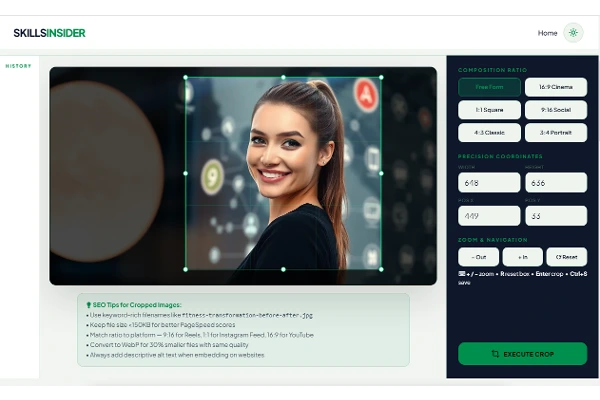
Pro Tip: Use Ctrl+S to save your crop instantly, or click any history thumbnail to re‑download a previous crop.
Crop Image Online FAQ & Tool Specs
How to crop a photo online safely?
To crop a photo safely, drop your image into our Pro Studio Elite dashboard. Select your desired framing boundaries or input custom pixel dimension constraints, then click export to save the newly bounded layout instantly.
Is this online image cropper private?
Yes, completely. Unlike traditional cloud photo structures, this utility functions 100% locally using HTML5 Canvas processing inside your secure local sandbox browser. Your source graphics are never uploaded to an external system server.
Can I process a batch image crop at once?
Our studio engine is fine-tuned for high-speed local processing. You can manage asset adjustments sequentially and maintain your workflow velocity using instant browser cache memory and integrated hardware shortcuts.
What aspect ratio presets are available?
The platform includes ready-made configuration slots for 16:9 Cinema (ideal for YouTube headers/thumbnails), 9:16 Social (TikTok & Instagram Stories), 1:1 Square, and classic standard grid printing formats.
Will using this image cutter reduce output quality?
No quality is dropped. The local matrix calculation preserves the absolute native resolution scale and density structure of the original digital media files, producing crisp pixels on every standalone download.
Are there advanced keyboard shortcuts?
Yes. For a faster workspace experience, developers and editors can execute an instant file generation action using the Ctrl + S binding block configuration directly from the device keyboard.
More Image Tools You'll Love
Now Compress Your Cropped Image
Just exported a crop? Shrink the file size in seconds with our free Image Compressor — keep your visual quality while cutting load times for web, email, or social uploads.
compressTry Image Compressor